
Whitesec One · GRC platform
One workspace for the evidence behind ISO 27001, SOC 2 and the Essential Eight.
Whitesec One is the GRC platform our consultants build client programs in. Risks, controls, audits and the evidence behind them live in one place, not in spreadsheets and email threads.
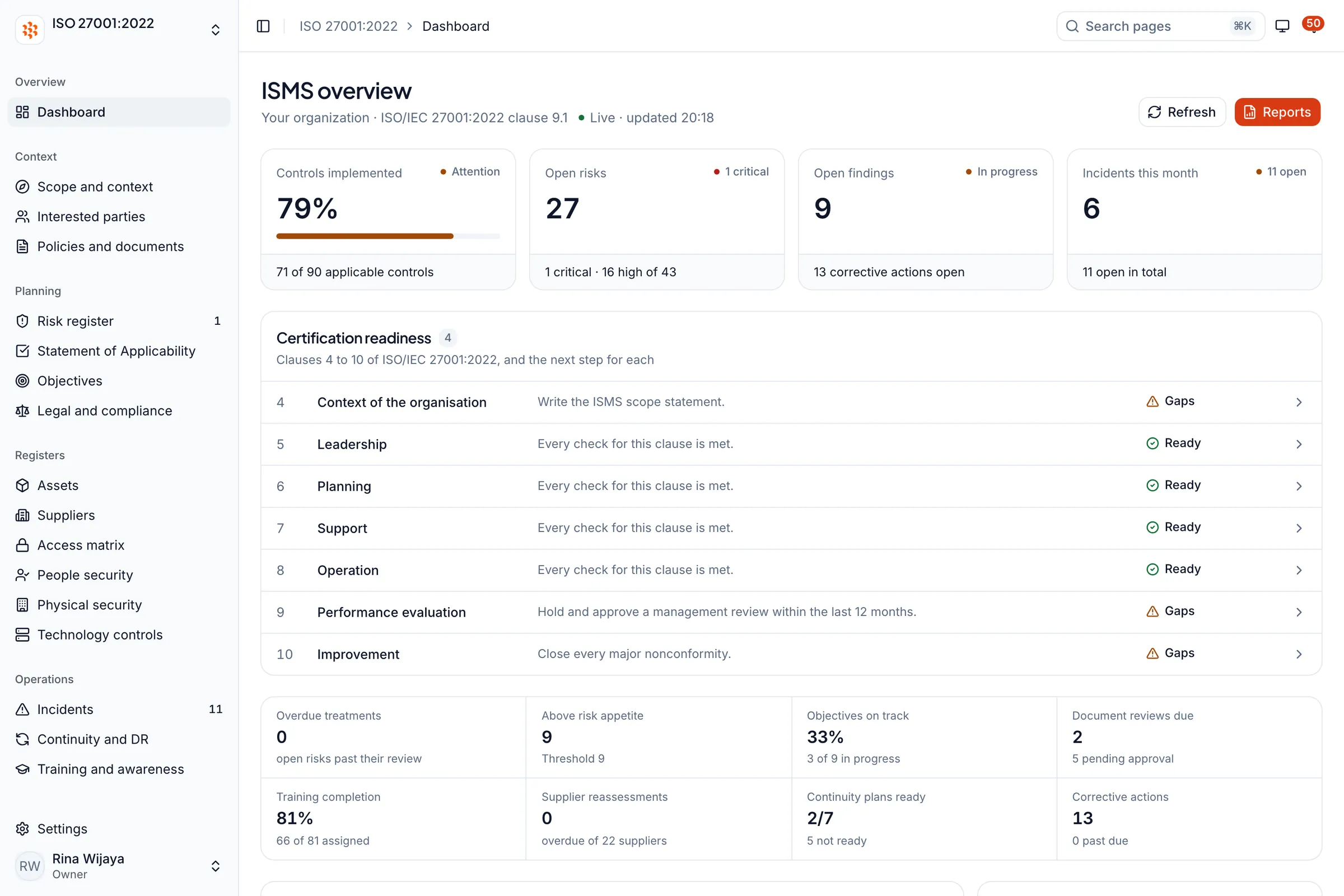
Screenshot of the live dashboard with sample data.
- Frameworks
- ISO 27001:2022, SOC 2 Type II, Essential Eight, ISO 27701:2025
- Built by
- Whitesec ID, with Whitesec AU
- Supported in Australia by
- Whitesec AU, West Perth
- Works on
- Desktop and mobile browsers
What it is
A workspace laid out the way the standards are written.
Each framework gets its own workspace. Underneath, your organisation keeps one set of records: a risk is entered once, owned by a person, rated, treated and signed off, and the same record shows up wherever another framework needs it.
Evidence on demand
A tender, an insurance renewal or an enterprise vendor review asks for proof. Registers export to CSV, Excel and PDF from the same data the dashboards read, so what you send is the program you actually run.
One set of records for several frameworks
SOC 2 reads your own risk, supplier, incident and policy registers, and so does the ISO 27001 workspace. Add a framework without re-keying what you already hold.
Your consultant works in your records
Whitesec AU consultants work alongside your team inside the workspace, not on copies sent by email, so what the auditor sees is what you actually keep.
Inside the workspace
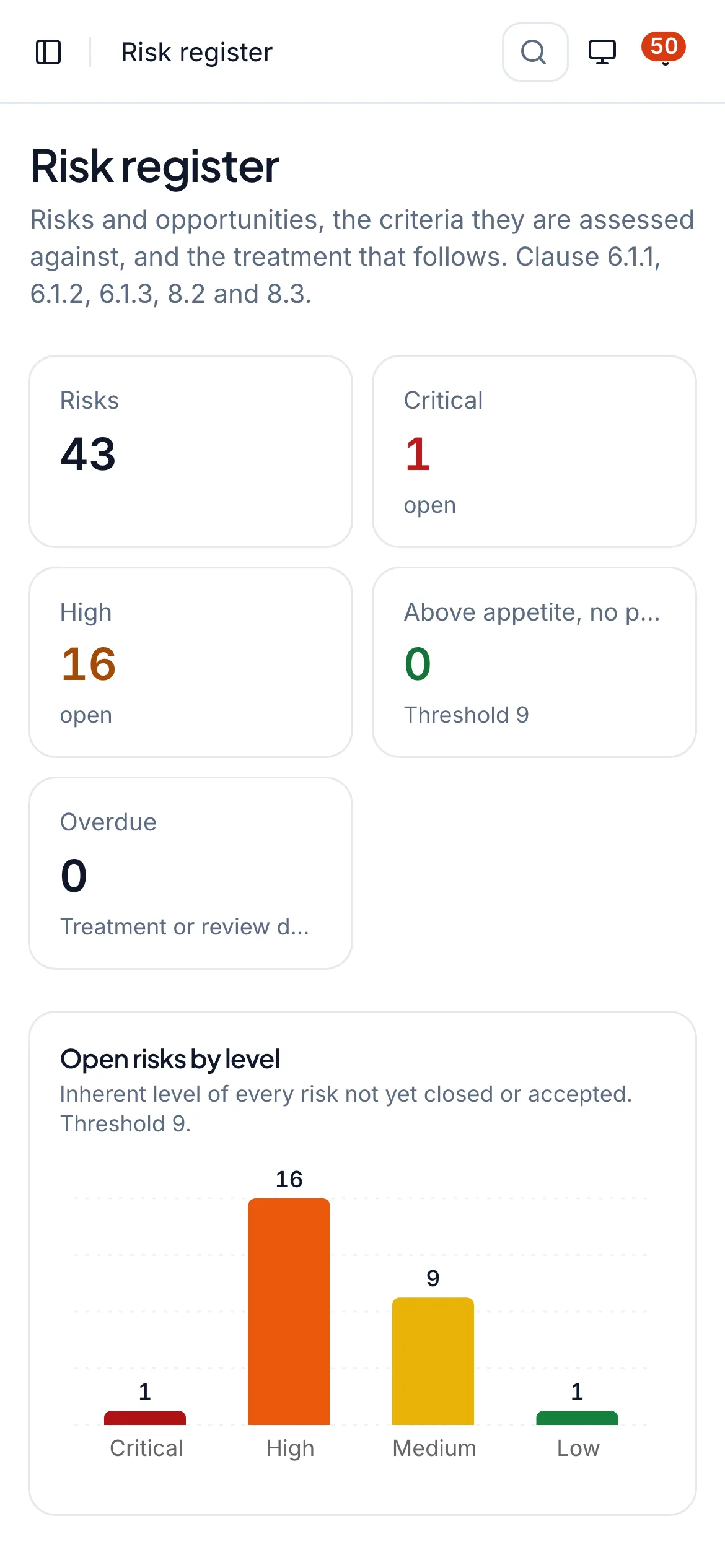
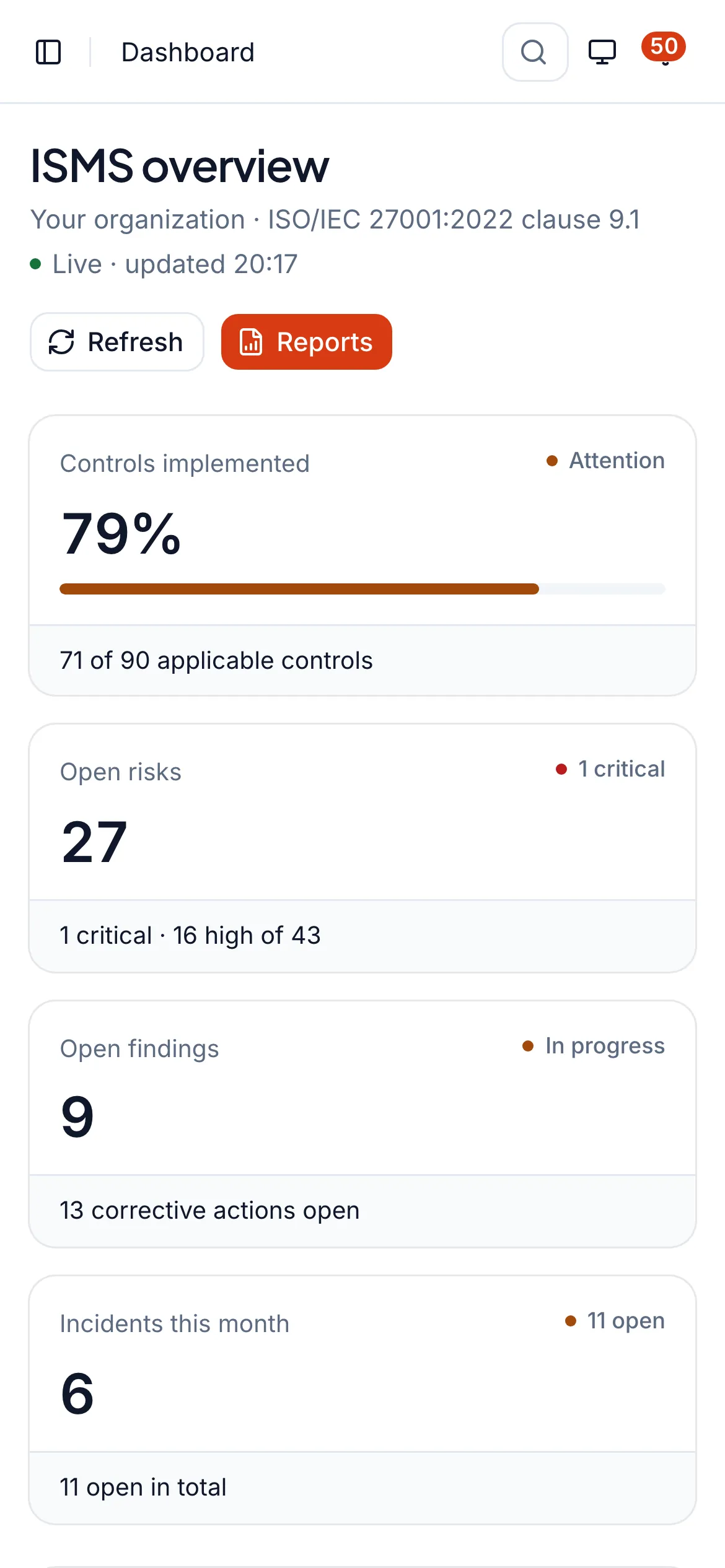
The real dashboard, on desktop and on a phone.
These are screens from the application, not illustrations. The same pages reflow on a phone, so a consultant or an auditor can check a register from anywhere.
Certification readiness for clauses 4 to 10, with the next action for each.
Screenshot of the live dashboard with sample data.
Frameworks
The programs Australian organisations are asked about.
Subscribe to the frameworks you need. They read the same underlying registers, so evidence is kept once.
ISO/IEC 27001:2022
Clauses 4 to 10 · 93 Annex A controls
The registers, reviews and approvals an information security management system keeps: a risk register with appetite and owner sign-off, a versioned Statement of Applicability, internal audit, management review and corrective actions.
SOC 2 Type II
61 criteria · Type I and Type II
A Type II engagement from scope to bridge letter: the system description in DC 200 order, a control matrix with criteria coverage, samples planned from each control's frequency, exceptions with management responses, PBC requests and bridge letters. The report and its opinion come from your independent service auditor.
ASD Essential Eight
Maturity Level Zero to Three
Requirement-level assessments against the ASD's November 2023 maturity model, levels that cannot be rounded up, gap analysis, remediation, patch windows worked out from the release date, and recurring checks.
ISO/IEC 27701:2025 privacy management is also available for organisations that process personal data. See the privacy workspace(opens in a new tab)
Records and workflows
Workflows that leave a record an auditor can test.
The controls below are enforced by the application, so the records stand up when an assessor samples them.
Risk register with appetite
A 5x5 likelihood and impact scale, an appetite threshold and treatment options. A risk cannot close while its residual score sits above appetite, and the risk owner signs off the treatment plan.
A Statement of Applicability that stays honest
All 93 Annex A controls with applicability, owner and review date. An exclusion needs a real justification, and each approved version is kept as a frozen snapshot.
Approval by a second person
Risk criteria, each Statement of Applicability version, policies and continuity plans are approved by someone other than their author. Evidence is accepted only by someone other than the person who collected it.
Findings become corrective actions
An audit finding is recorded as a nonconformity and becomes a corrective action with an owner, a due date and the evidence that closed it.
Reminders before things lapse
Anything due within 30 days, or overdue, appears as a notification in the app, from treatment dates to patch windows.
Exports for the auditor
Registers export to CSV, Excel and PDF from the same data the dashboards read, so the pack you hand over is the program you run.
- app.whitesec.one/iso27001/soa
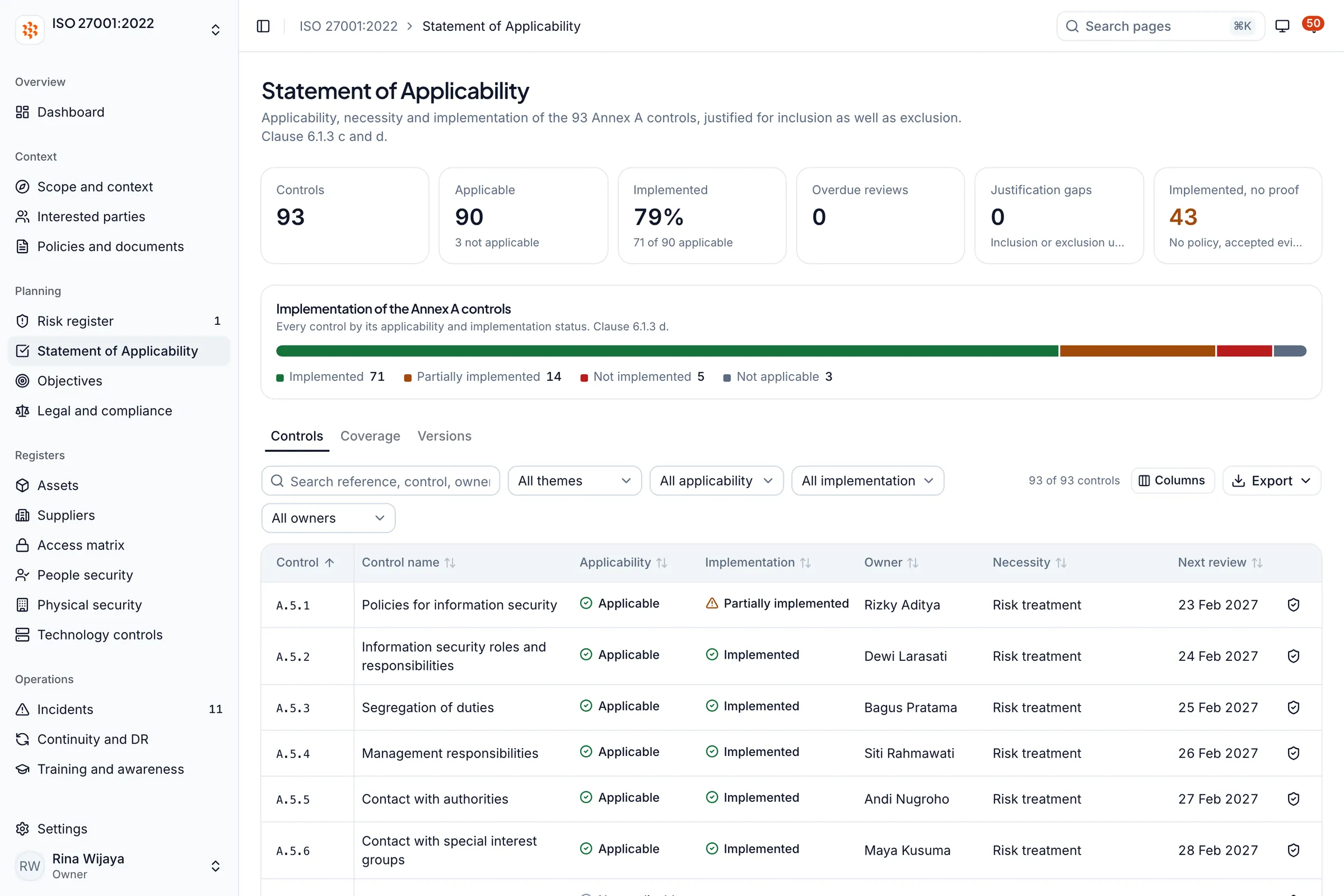
Statement of Applicability
All 93 Annex A controls with applicability, status, owner and review date.
- app.whitesec.one/iso27001/reports
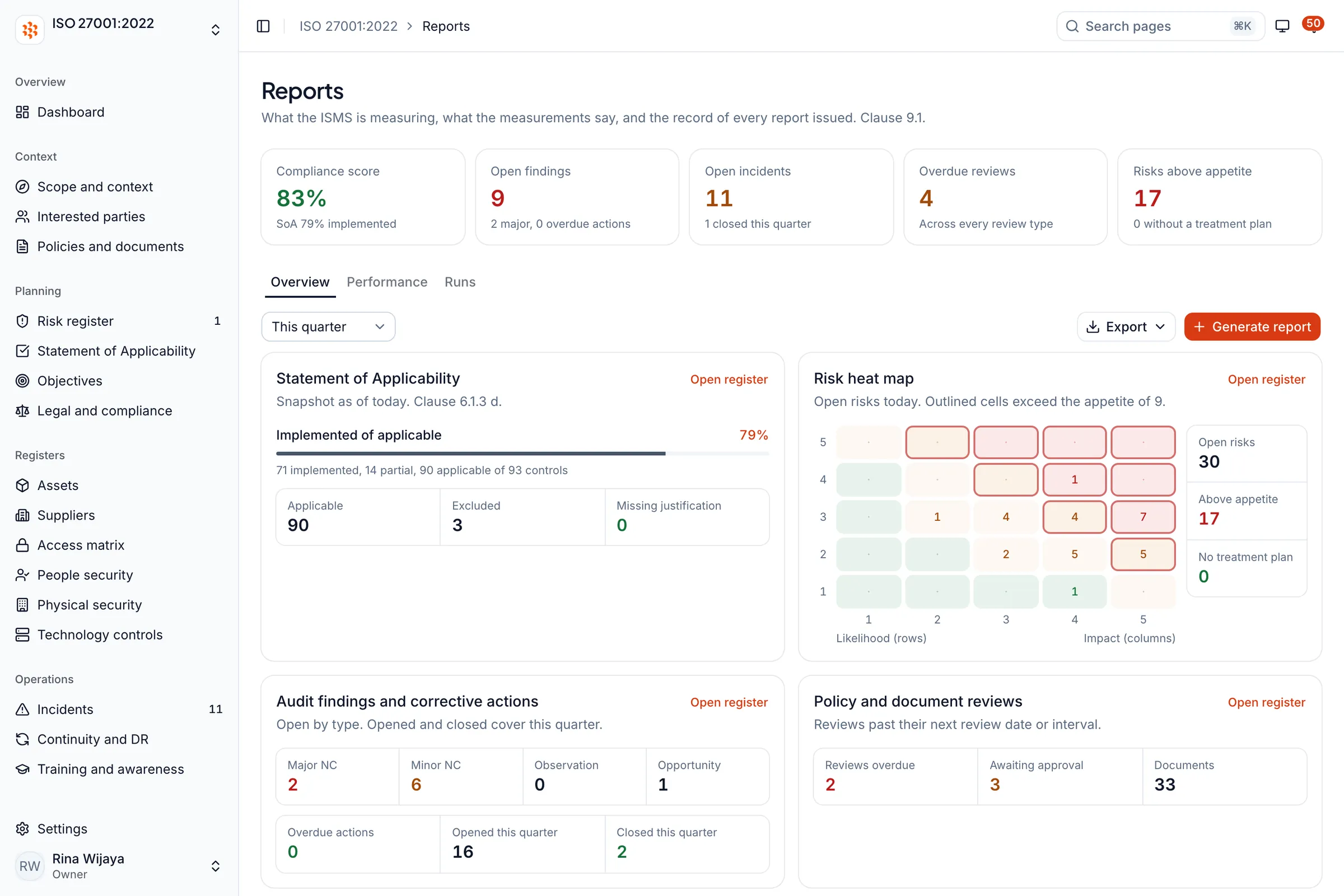
Reports and risk heat map
Compliance score, risk heat map and the state of audit findings in one view.
- app.whitesec.one/soc2/control-matrix
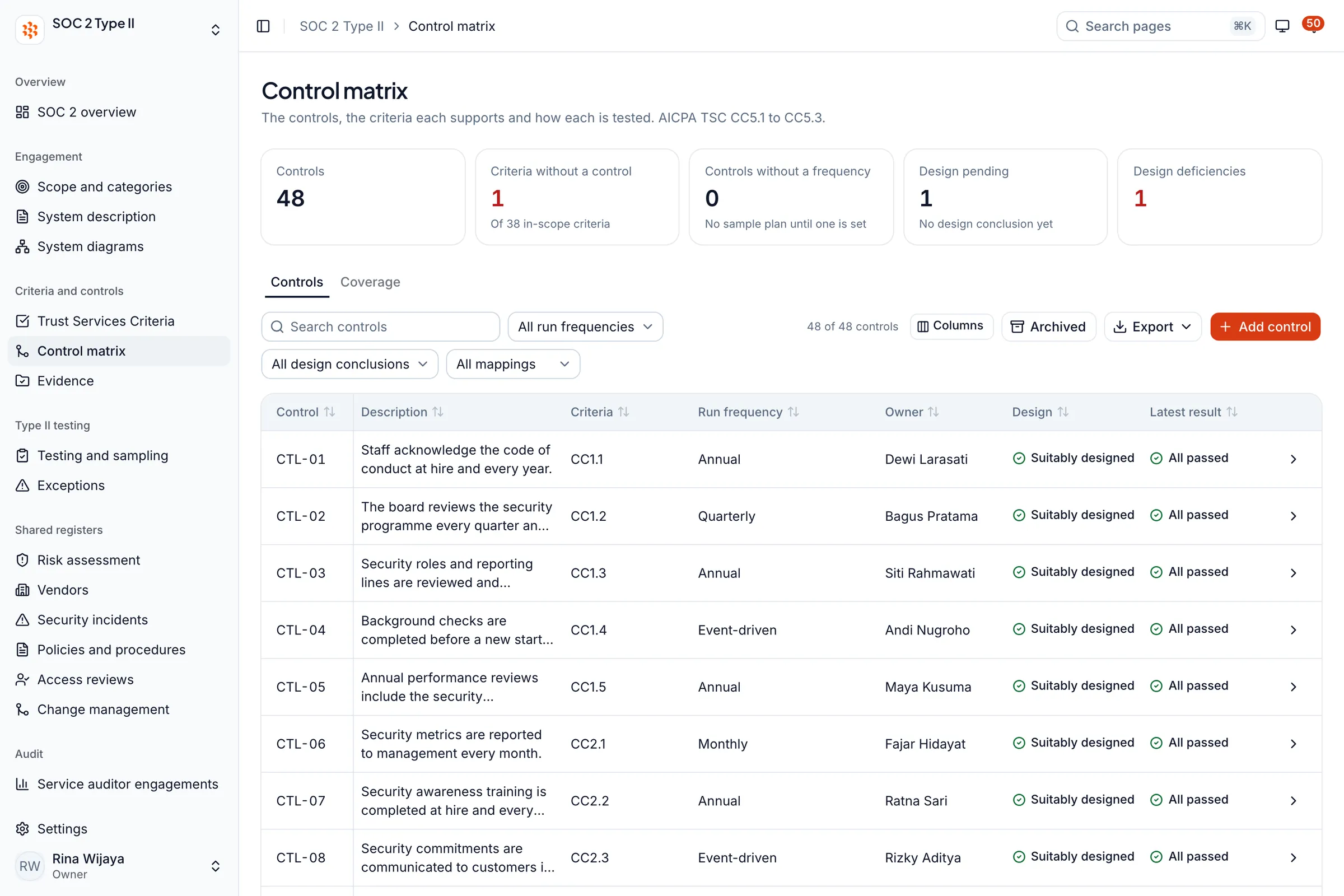
Control matrix
Controls mapped to criteria, with frequency, owner, design conclusion and latest result.
Screenshot of the live dashboard with sample data.
For people outside your team
Customers, suppliers and staff see only what you publish.
Trust Center
A public page you publish from the workspace: certifications, control summaries, subprocessors, answers to common questions and documents released on request.
Vendor portal
Suppliers answer their assessment through a private link that expires. They need no account, and the answers land on your supplier register.
Training and awareness
Participants read the material, take a quiz and receive a completion certificate, with the results recorded against the program.
Four access levels
Each person opens only the dashboards they are given.
Dashboard access follows the workspace plan and each member, and is enforced on the server.
- Owner
- Sets up the workspace, invites members and decides which dashboards each person can open.
- Editor
- Adds, edits, approves and archives records in every dashboard they can open.
- Auditor
- Reads everything in full and exports evidence. Records audit work, findings and corrective actions, and changes nothing else.
- Viewer
- Reads only. Emails, phone numbers and data subject names are masked by the database.
With Whitesec AU
Platform and consultants, working in the same records.
We prepare you; an independent body assesses you. The platform is where that preparation is kept.
- 01
Scope the program
We agree the frameworks, the boundary and the date an auditor, tender or insurer needs the evidence.
- 02
Set up your workspace
Your plan, your members and their access levels, so each person opens only what they should.
- 03
Build the records together
Risks, controls, policies and evidence are entered with your team and a Whitesec AU consultant, inside your workspace.
- 04
Pre-audit before the assessor
An internal audit and a management review run before the external assessment, so Stage 1 or fieldwork holds no surprises.
- 05
Independent assessment
An accredited certification body or your CPA service auditor assesses you. Preparing you and certifying you stay separate.
What it does not do
Stated plainly, so you can plan around it.
- It does not issue certificates or SOC 2 reports. Those come from an accredited certification body and from your independent service auditor.
- It does not connect to or scan your systems. It records assessments, evidence and patch status; technical monitoring is a separate Whitesec AU service.
- It does not replace your auditor or your judgement. It keeps the records they examine in a form they can test.
- It makes no hosting-region promise on this page. Where the data sits is confirmed with you during scoping.
Security of the platform
Built by a team that is audited too.
Whitesec ID, which builds and operates Whitesec One, is certified to ISO/IEC 27001 (verified by SGS under UKAS accreditation).
- Each workspace is isolated in the database with row-level security, and a test plants canary records to prove one workspace cannot read another.
- Personal data is masked by the database for the read-only Viewer level.
- Changes to records are logged with who made them and when.
Questions
Before you ask for a walkthrough
See your own registers in Whitesec One.
We walk through the workspaces for the frameworks you need, with the team in West Perth. Already a client? Sign in at app.whitesec.one.